
AdvanceAd hoc
How to use NetEase Cloud Music
Verity-cn has built-in NetEase cloud music integration, which allows Verity to play songs and display lyrics.
This article is outdated
The settings screen was heavily redesigned in v3.5, so it no longer matches the screenshots. NetEase Cloud Music needs no toggle anymore — it works by default.
This article is a temporary document, which will be replaced with a detailed explanation of the complete music configuration.
1. Turn on NetEase Cloud Music
Open the Mod configuration interface and findSong Type, combine the followingNetEase Cloud Music master switchJust open it.
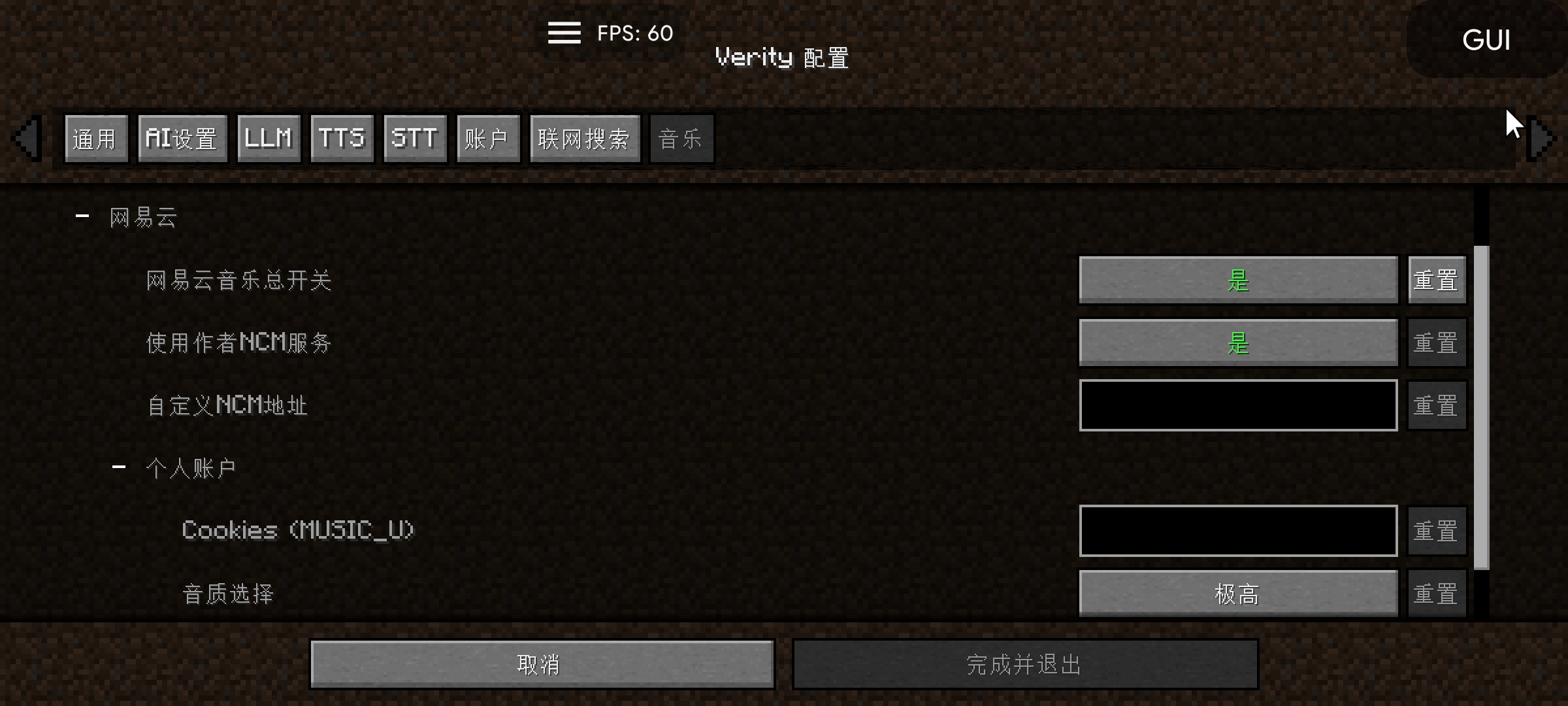
2. Free songs
This projectNo and definitely notFor services such as VIP cracking of NetEase cloud music, only free songs can be played.
3. Play member songs (music_U)
If you want to play a member song, you need to fill in your own MUSIC_U。
How to get it: Download the browser extension from the link below and install it yourself.
Be sure to get it from this source, data breaches caused by browser plug-ins from other channels are not related to me. This plugin is completely offline and has no network permissions, please feel free to use it.
4. Lyric customization
There are also lyrics related configurations under the NetEase Cloud Music Settings. You can customize the lyrics display to a certain extent. Please set it according to your personal preferences.
5. NCM Service Settings
NCM service related settingsI don't understand. Please don't move., Misconfiguration may cause abnormal music function.